| Version 2 (modified by jdalbey, 7 years ago) (diff) |
|---|
Graphic Traffic Events Creator - Preliminary Specification
The purpose of this tools is to provide a Graphical User Interface to allow the author of an Incident Script to build a file of traffic events to be used by CPTMS to show colored dots on the highway display that represent traffic congestion.
The concept is a CPTMS like display that is enhanced to allow user interaction. The author will click on dots on the highway network to specify VDS stations whose values are to be modified.
The current CPTMS display will be enhanced to include two additional controls:
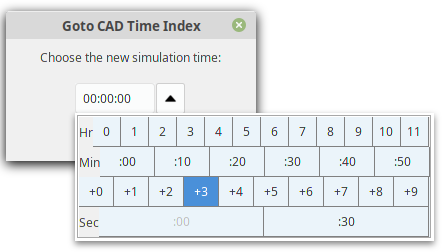
- A time selector - the is used to select the simulation time for which the traffic events are to be created.
- A color selector - a drop down box with three color choices: green, yellow, and red.
Use Case
System: Displays the CPTMS highway network with all dots green.
System: Clears the traffic events file.
User: Selects 0:01:00 in the time selector.
User: Selects Yellow in the color selector.
User: Clicks on VDS "55 N 6.35 @ MAIN"
System: Changes the above dot to Yellow.
User: Clicks on VDS "55 N 6.94 @ MCARTHUR"
System: Changes the above dot to Yellow.
User: Selects 0:01:30 in the time selector.
System: Write two records to traffic events file:
1   00:01:00  55     N         6.35     Y
1   00:01:00  55     N         6.94     Y
User: Selects Yellow in the color selector.
User: Clicks on VDS "55 N 7.16 @ MCARTHU2"
System: Changes the above dot to Yellow.
User: Selects Red in the color selector.
System: Write one record to traffic events file:
1   00:01:30  55     N         7.16     Y
User: Clicks on VDS "55 N 6.35 @ MAIN"
System: Changes the above dot to Red.
User: Clicks on VDS "55 N 6.94 @ MCARTHUR"
System: Changes the above dot to Red.
User: Selects 0:02:00 in the time selector.
System: Write two records to traffic events file:
1   00:01:30  55     N         6.35     R
1   00:01:30  55     N         6.94     R
User continues to select one or more dots to be assigned a specified color at a specified time. These are all changes for a SINGLE incident.
When complete, the user manually edits the data file to change the "1" in the first column to the desired incident number, eg., 181.
User then repeats the process for the next incident. When all incidents have been created, user manually concatenates the files for all incidents, then sorts them by timestamp. The resulting file is ready to be used by CPTMS.
Attachments
-
TimeDialog.png
 (13.7 KB) -
added by jdalbey 6 years ago.
(13.7 KB) -
added by jdalbey 6 years ago.
Screenshot of Time Selection Dialog from Simulation Manager