
Ticket #153 (new defect)
CMS Edit Dialog truncates display at certain font sizes
| Reported by: | jdalbey | Owned by: | jdalbey |
|---|---|---|---|
| Priority: | Low | Milestone: | May 2021 Training |
| Component: | CPTMS | Version: | |
| Severity: | Trivial | Keywords: | |
| Cc: |
Description
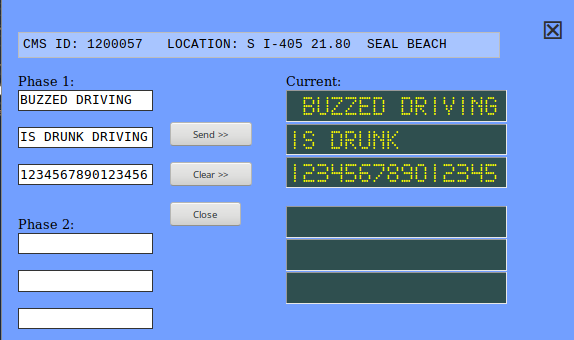
The "Current" panel of the CMS edit dialog will truncate the displayed text at certain font sizes. This occurs in Firefox when the user manually increases/decreases the font size (View-Zoom In). The display should show 16 characters wide. At 80% it shows only 15 characters.
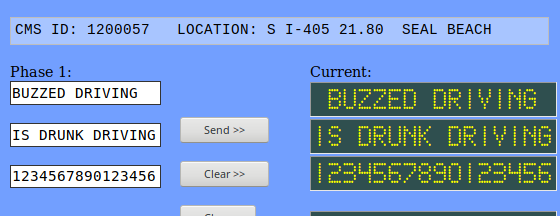
In the attached screenshot (taken at 80%) the word "DRIVING" doesn't appear on the second line as it should. It does appear correctly at 67% or 90%.
Workaround: Change the font size to a larger (or smaller) value by zooming as needed.
Attachments
-
truncate_defect1.png
 (18.3 KB) -
added by jdalbey 7 years ago.
(18.3 KB) -
added by jdalbey 7 years ago.
- Screenshot of truncated message in CMS Edit Dialog
-
truncate_defect2.png
(17.4 KB) -
added by jdalbey 7 years ago.
- Correct message display (at font size 90%)
Change History
Changed 7 years ago by jdalbey
-
attachment
truncate_defect1.png
added
Changed 7 years ago by jdalbey
-
attachment
truncate_defect2.png
added
Correct message display (at font size 90%)
Note: See
TracTickets for help on using
tickets.


Screenshot of truncated message in CMS Edit Dialog